

Cookie Consent for WordPress
Cookiezy gives WordPress teams a cleaner path to consent management through the dedicated WordPress plugin package. Instead of wiring theme snippets manually, you upload the plugin ZIP, configure it in wp-admin, and use shortcodes for the settings link and cookie audit. The premium issued package is intended to carry embedded licensing values so the end user does not need to configure site-key verification manually.
A lightweight WordPress consent layer for publishers, businesses, and agencies.
Cookie banner preview
Lightweight. Fast. Clear by default.
What the WordPress ZIP includes
After account access is active you generate `cookiezy-wordpress-plugin.zip`. It contains a full WordPress plugin with admin settings, consent assets, scanning support, canonical shortcodes, and embedded licensing values for the account.
- • `cookiezy.php`
- • `includes/class-cookiezy-settings.php`
- • Plugin CSS and JavaScript assets for the banner and scanner
- • Shortcodes: `[cookiezy_settings_link]` and `[cookiezy_cookie_audit]`
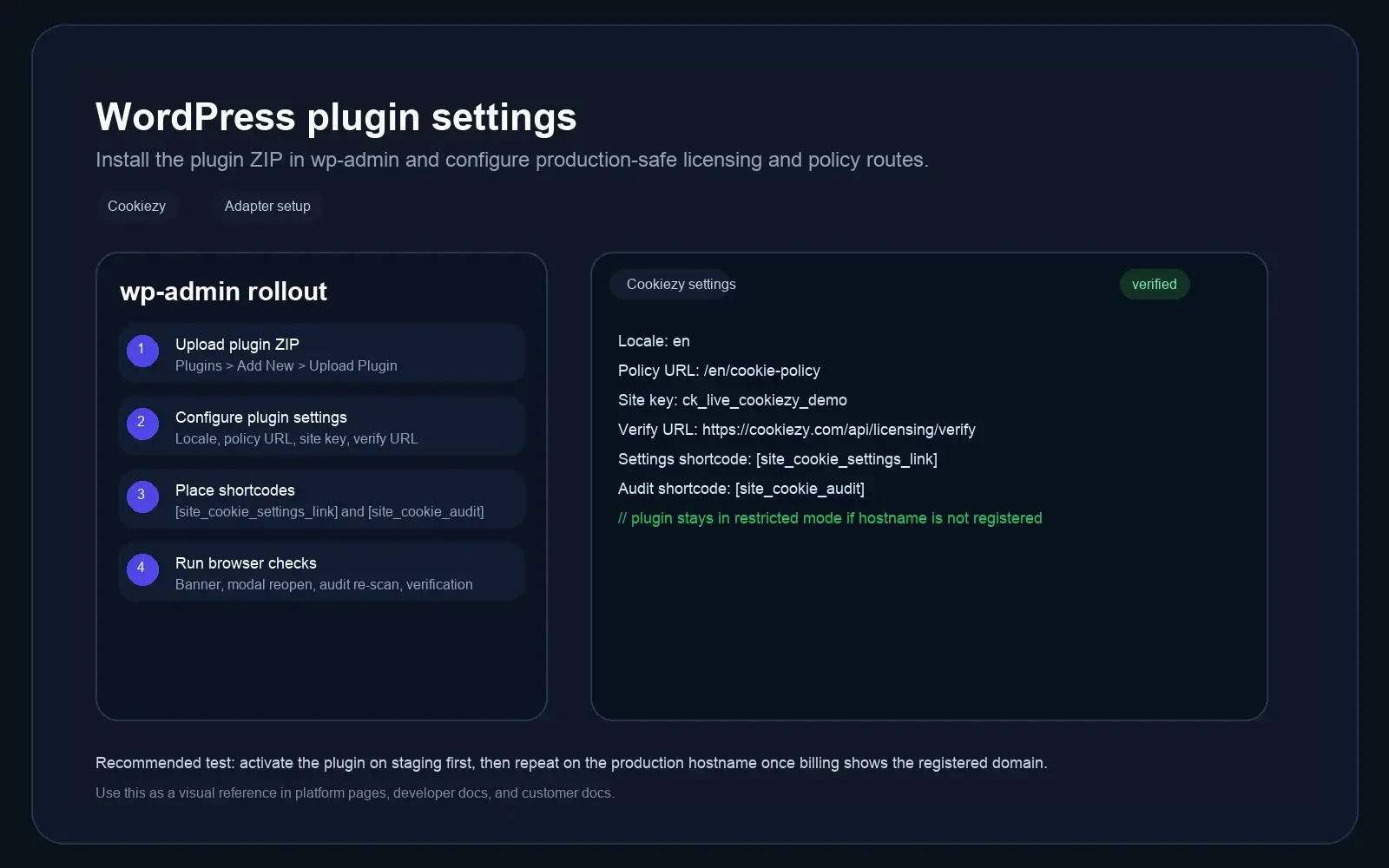
Upload and activate the WordPress plugin
In WordPress admin go to Plugins, choose Add New, then Upload Plugin. Select `cookiezy-wordpress-plugin.zip`, install it, and activate it. You do not need to copy JavaScript files into your theme manually for the packaged WordPress flow.
- • Upload `cookiezy-wordpress-plugin.zip` directly in wp-admin
- • Activate the plugin after installation completes
- • Confirm a Cookiezy settings screen appears in the admin area
Configure the plugin in wp-admin
Open the Cookiezy plugin settings and fill in your locale, policy page URL, categories, and any GTM or GA4 details you want to use. The issued package already contains the account licensing values, so the settings screen stays focused on content and integrations instead of technical license setup. If embedded licensing values are missing or billing is inactive, the plugin should remain in necessary-only restricted mode.
Code snippet
Locale: en
Policy URL: /en/cookie-policy
Categories: necessary, analytics, marketing
Optional integrations: GTM / GA4
Settings link shortcode: [cookiezy_settings_link]
Cookie audit shortcode: [cookiezy_cookie_audit]Add the settings link, cookie audit, and validate restricted-mode recovery
Place `[cookiezy_settings_link]` in the footer or policy area where visitors should reopen preferences. Place `[cookiezy_cookie_audit]` on your cookie policy page to show the live audit block, then test the site in a clean browser session.
- • Add `[cookiezy_settings_link]` to the footer or a reusable block
- • Add `[cookiezy_cookie_audit]` to the cookie policy page
- • Open the site in incognito and verify optional categories stay blocked until consent
- • Confirm the settings link reopens the modal after the first choice
- • If you test with inactive billing or missing embedded licensing values, confirm the plugin stays in necessary-only restricted mode
Use a shortcode to show the site's detected cookies
The WordPress plugin includes a cookie audit shortcode for premium issued packages. Place `[cookiezy_cookie_audit]` on the policy page to show detected cookies with category, provider, purpose or description, and duration, plus a re-scan action after consent changes.
Live cookie scan for this browser session
This audit reads the cookies currently visible on the domain in your browser and maps known cookies to categories and purposes. Re-scan after changing consent to verify what stays active.
How Cookiezy handles cookies on this site
Necessary cookies stay active so the site, login flow, and consent preferences keep working. Optional categories can be enabled or disabled by the visitor through Cookiezy settings.
This scan reflects the current browser session and the current state of consent on this device.
Cookie categories used on the site
Necessary
Required for security, routing, authentication, and storing the consent choice itself.
Analytics
Used to understand traffic and site usage when the visitor has granted analytics consent.
Marketing
Reserved for advertising, retargeting, and campaign tracking when marketing consent is granted.
WordPress features focused on speed and simplicity
Built for content-driven teams that want the basics done well.
True WordPress plugin
The WordPress package ships as an installable plugin, not as a generic theme snippet.
Admin-managed settings
Configure locale, policy routes, and integrations in wp-admin instead of editing theme files.
WordPress cookie consent FAQ
A few quick answers before you roll out Cookiezy on WordPress.
Which ZIP should I use for WordPress?
Use `cookiezy-wordpress-plugin.zip`. That is the dedicated issued WordPress package and the intended install path for WordPress sites.
Do I need to upload JavaScript files into my theme?
Not for the packaged WordPress flow. The plugin includes the consent assets and settings UI, so the install is handled through wp-admin.
How do I add the cookie audit to the policy page?
Use `[cookiezy_cookie_audit]` on the cookie policy page.
How do visitors reopen consent settings later?
Use `[cookiezy_settings_link]` in the footer or another persistent area of the site.