

CookiezyCookiezy
ProductPlatformsDocsPricingBlogContact
  1. Home/
  2. Docs/
  3. Headless Adapter Setup

Docs navigation

Overview

DocsDeveloper-first documentation for installing, configuring, and verifying Cookiezy across every supported adapter.Getting StartedCheck readiness, generate the right package, then ship the core flow.InstallationInstallation follows the same core pattern everywhere: generate the issued package, register the hostname, install the adapter, and validate runtime verification before launch.ConfigConfiguration keeps locale, policy, categories, layout, and licensing context in sync.

Reference

APIDeveloper-facing runtime methods, browser events, and verification-aware integration notes.

Adapters

Webflow Adapter SetupTechnical Webflow setup guide for Cookiezy: what you receive after purchase, where each file goes, and how to validate the runtime on a published Webflow site.Shopify Adapter SetupTechnical Shopify setup guide for Cookiezy: download Platform Core, deploy the theme app extension, expose the Theme Editor fields, and validate storefront consent behavior before publish.Wix Adapter SetupTechnical Wix setup guide for Cookiezy: host the custom-code package, wire head and footer snippets, and validate licensing and audit behavior after purchase.Headless Adapter SetupTechnical headless setup guide for Cookiezy: boot the plain adapter, wire runtime verification, and validate the audit, settings, and restricted-mode recovery flow in custom frontends.WordPress Adapter SetupTechnical WordPress setup guide for Cookiezy: upload the plugin ZIP, configure licensing-aware settings, and validate shortcode-based settings and audit behavior.React Adapter SetupTechnical React setup guide for Cookiezy: load the plain adapter from the app shell, gate optional services with consent state, and validate SPA behavior.Next.js Adapter SetupTechnical Next.js setup guide for Cookiezy: load the plain adapter from the root layout, keep policy routing localized, and validate consent gating across App Router pages.Strapi Adapter SetupTechnical Strapi setup guide for Cookiezy: keep the runtime on the frontend, use Strapi as a configuration bridge, and map locale-aware policy URLs through the shared core model.
Overview

Headless adapter: post-purchase rollout

Use this guide for any custom frontend that relies on the plain adapter runtime from the ZIP package.

  • • Download `platform-cookie-core.zip` from the customer area.
  • • Copy the plain adapter and shared core assets into your global shell or CDN.
  • • Register every live hostname in billing.
  • • Boot the runtime with `license.siteKey`, `license.verifyUrl`, and `license.billingUrl` before UI and scanner load.
  • • Validate `allowed: true`, consent state gating, policy page audit behavior, and the necessary-only fallback when licensing is not active.
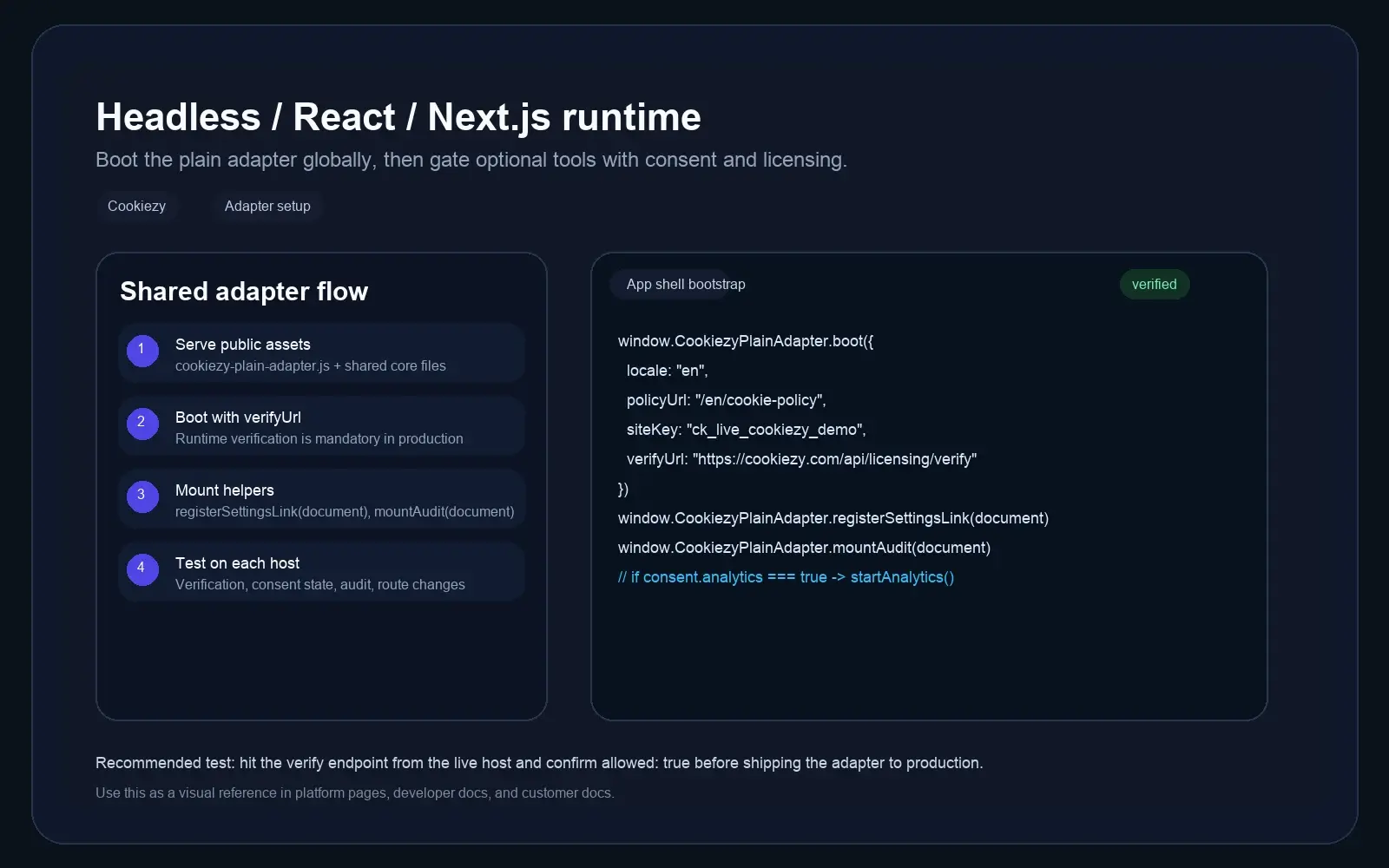
Developer documentation screenshot for the Cookiezy headless adapter showing shell bootstrap and licensing verification.
Headless technical reference: plain adapter boot, verify URL, and shared runtime helpers.
Step 1

Load the runtime from the app shell

Cookiezy

Lightweight consent platform for modern websites.

Product

FeaturesPlatformsPricingDocsBlogContact

Legal

Cookie PolicyPrivacy PolicyTerms

Language

Privacy controls

© 2026 Cookiezy. All rights reserved.

Serve the shared CSS, core runtime, UI, scanner, and the canonical `cookiezy-plain-adapter.js` entry file from a path available to every route.

Code snippet

<link rel="stylesheet" href="/cookie-consent.css" />
<script src="/cookiezy-plain-adapter.js"></script>
<script src="/cookie-consent.js"></script>
<script src="/cookie-consent-ui.js"></script>
<script src="/cookie-consent-scanner.js"></script>
Step 2

Boot with licensing verification enabled

Runtime verification is mandatory for production so the adapter cannot be copied to unlimited domains without an active licensed hostname.

Code snippet

window.CookiezyPlainAdapter.boot({
  defaultLocale: "en",
  localeRoutes: {
    en: { policyUrl: "/en/cookie-policy", pathPrefixes: ["/en"] },
    sl: { policyUrl: "/sl/politika-piskotkov", pathPrefixes: ["/sl"] },
    de: { policyUrl: "/de/cookie-policy", pathPrefixes: ["/de"] }
  },
  storageKey: "cookiezy_headless_v1",
  license: {
    siteKey: "ck_live_cookiezy_demo",
    verifyUrl: "https://cookiezy.com/api/licensing/verify",
    billingUrl: "https://cookiezy.com/en/billing"
  }
});
Multilang

Use locale routes when the site has localized URLs

The shared core now supports `defaultLocale` plus `localeRoutes`. On plain headless sites, this is the recommended way to keep banner language and the cookie policy link aligned with `/en`, `/sl`, or other locale folders.

  • • If you already know the locale from your router, you can still pass `locale` directly.
  • • If you use folder-based routes, set `pathPrefixes` so Cookiezy can infer the active locale from the current URL.
  • • Each locale route should point to the matching cookie policy page.
Step 3

Wire helpers and run production tests

Use the helper methods on every production frontend so visitors can reopen settings and inspect the policy page audit.

Code snippet

window.CookiezyPlainAdapter.registerSettingsLink(document);
window.CookiezyPlainAdapter.mountAudit(document);
Testing

Headless test checklist

Do these checks before launch on each hostname.

  • • Verification endpoint returns `allowed: true` for the registered hostname.
  • • First visit shows the banner.
  • • Optional analytics stays gated until consent.
  • • Settings link reopens the modal.
  • • Policy page audit mounts and re-scan reflects the current state.
  • • If licensing is missing or inactive, the runtime falls back to necessary-only restricted mode and shows a billing recovery path.