

CookiezyCookiezy
ProductPlatformsDocsPricingBlogContact
  1. Home/
  2. Docs/
  3. Next.js Adapter Setup

Docs navigation

Overview

DocsDeveloper-first documentation for installing, configuring, and verifying Cookiezy across every supported adapter.Getting StartedCheck readiness, generate the right package, then ship the core flow.InstallationInstallation follows the same core pattern everywhere: generate the issued package, register the hostname, install the adapter, and validate runtime verification before launch.ConfigConfiguration keeps locale, policy, categories, layout, and licensing context in sync.

Reference

APIDeveloper-facing runtime methods, browser events, and verification-aware integration notes.

Adapters

Webflow Adapter SetupTechnical Webflow setup guide for Cookiezy: what you receive after purchase, where each file goes, and how to validate the runtime on a published Webflow site.Shopify Adapter SetupTechnical Shopify setup guide for Cookiezy: download Platform Core, deploy the theme app extension, expose the Theme Editor fields, and validate storefront consent behavior before publish.Wix Adapter SetupTechnical Wix setup guide for Cookiezy: host the custom-code package, wire head and footer snippets, and validate licensing and audit behavior after purchase.Headless Adapter SetupTechnical headless setup guide for Cookiezy: boot the plain adapter, wire runtime verification, and validate the audit, settings, and restricted-mode recovery flow in custom frontends.WordPress Adapter SetupTechnical WordPress setup guide for Cookiezy: upload the plugin ZIP, configure licensing-aware settings, and validate shortcode-based settings and audit behavior.React Adapter SetupTechnical React setup guide for Cookiezy: load the plain adapter from the app shell, gate optional services with consent state, and validate SPA behavior.Next.js Adapter SetupTechnical Next.js setup guide for Cookiezy: load the plain adapter from the root layout, keep policy routing localized, and validate consent gating across App Router pages.Strapi Adapter SetupTechnical Strapi setup guide for Cookiezy: keep the runtime on the frontend, use Strapi as a configuration bridge, and map locale-aware policy URLs through the shared core model.
Overview

Next.js adapter: post-purchase rollout

Use this guide after payment to move from ZIP download to a tested Next.js production integration.

  • • Download `platform-cookie-core.zip` from the customer area.
  • • Copy the plain adapter and shared assets into `public/`.
  • • Register each live hostname in billing.
  • • Load and boot the runtime from `app/layout.tsx` with a `license` object that includes `siteKey`, `verifyUrl`, and `billingUrl`.
  • • Validate localized policy routes, consent state, and audit behavior.
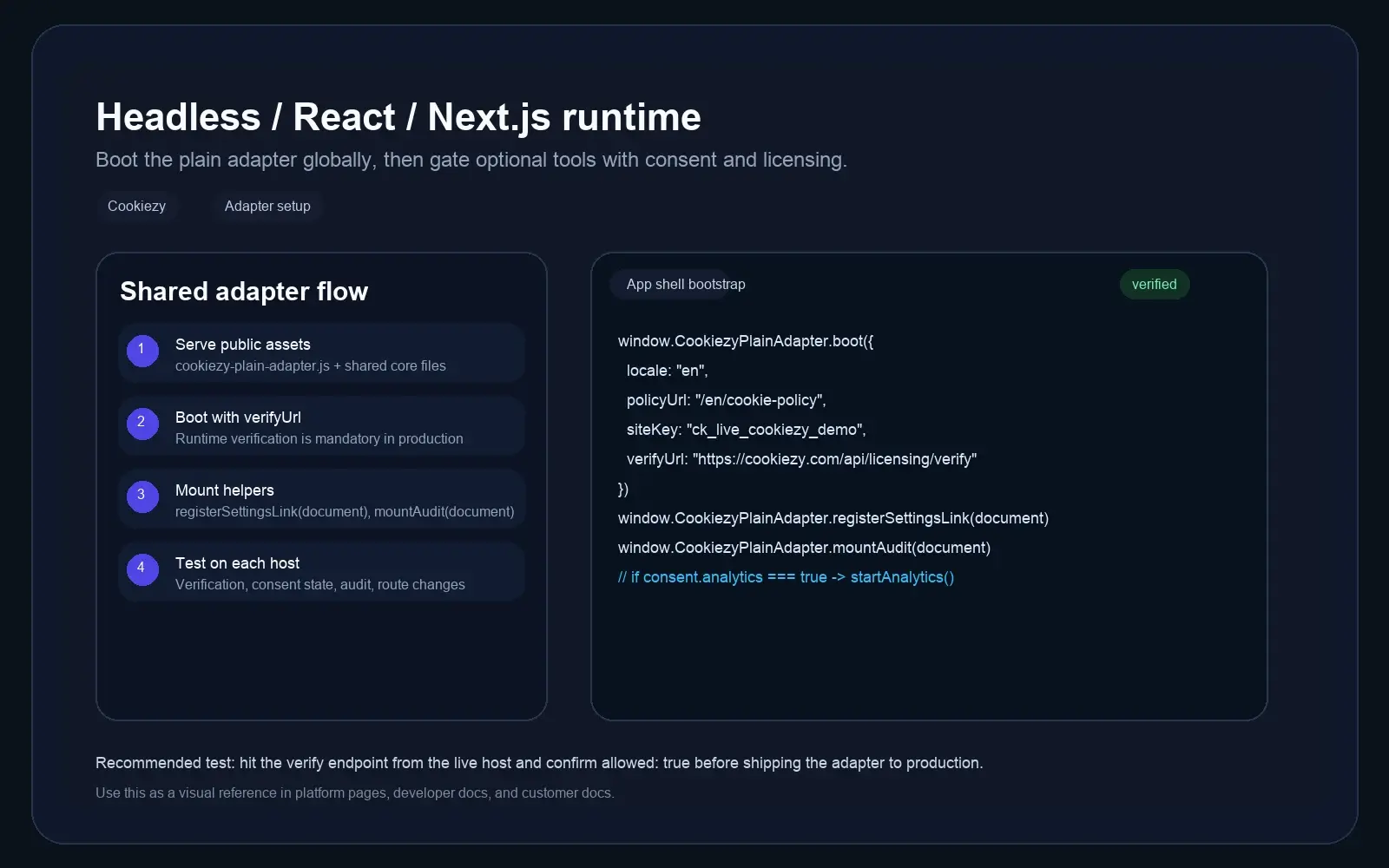
Developer documentation screenshot for the Cookiezy Next.js adapter showing root layout bootstrap and localized policy audit flow.
Next.js technical reference: root layout setup, localized policy route, and hostname verification.
Step 1

Serve the assets from `public/`

The root layout should be able to load the shared CSS and runtime assets across all routes and locales.

Cookiezy

Lightweight consent platform for modern websites.

Product

FeaturesPlatformsPricingDocsBlogContact

Legal

Cookie PolicyPrivacy PolicyTerms

Language

Privacy controls

© 2026 Cookiezy. All rights reserved.

Code snippet

public/cookiezy-plain-adapter.js
public/cookie-consent.js
public/cookie-consent-ui.js
public/cookie-consent-scanner.js
public/cookie-consent.css
Step 2

Boot the runtime from the root layout

Keep the consent layer globally available in App Router by loading the adapter from the root layout.

Code snippet

window.CookiezyPlainAdapter.boot({
  locale: locale,
  defaultLocale: "en",
  localeRoutes: {
    en: { policyUrl: "/en/cookie-policy", pathPrefixes: ["/en"] },
    sl: { policyUrl: "/sl/politika-piskotkov", pathPrefixes: ["/sl"] }
  },
  storageKey: "cookiezy_next_v1",
  license: {
    siteKey: "ck_live_cookiezy_demo",
    verifyUrl: "https://cookiezy.com/api/licensing/verify",
    billingUrl: "https://cookiezy.com/en/billing"
  }
});
Multilang

Map locale segments to policy routes in App Router

If your Next.js app uses `app/[locale]`, pass the segment locale directly and keep `localeRoutes` aligned with the localized cookie policy paths. This keeps the banner language and policy link in sync across all localized routes.

  • • Use the active route segment as `locale`.
  • • Use `localeRoutes` for per-locale cookie policy URLs.
  • • Register every production hostname in billing even if all locales share the same domain.
SPA locale switch

Refresh Cookiezy after a client-side locale change

If the active locale changes client-side, use `Cookiezy.setLocale()` so the banner and modal update immediately without a hard reload.

Code snippet

window.Cookiezy.setLocale("sl", {
  localeRoutes: {
    en: { policyUrl: "/en/cookie-policy", pathPrefixes: ["/en"] },
    sl: { policyUrl: "/sl/politika-piskotkov", pathPrefixes: ["/sl"] }
  },
  license: {
    billingUrl: "https://cookiezy.com/sl/billing"
  }
});
Step 3

Validate routing, audit, and licensing

Run the same checks on homepage, pricing, and policy routes before launch.

  • • Banner appears on first visit.
  • • Localized routes keep the correct policy page URL.
  • • Policy page audit mounts and re-scan works.
  • • Optional analytics starts only after consent.
  • • Verification endpoint returns `allowed: true` for each live hostname.
  • • If billing is inactive or the hostname is not registered, the runtime falls back to necessary-only restricted mode.